
Overlay in deck builder not working due to duplicate variants in collection

Started by steelslime37 on July 12, 2026 at 3:54 AM with 8 posts
steelslime37

steelslime37

OP

I imported my collection from Curiosa, and when I add cards to a deck, the overlay still says I "own" 0 and "need" however many I've added to my deck. When I download my collection, it appears that each card has two distinct representations, with different "variant slugs". (See below.) It appears that the slugs with leading numbers ("006") are what the overlay detects, but not the ones with leading short codes ("got"). Given that there appears to be no other distinction between the cards, there should not be different stubs. (In fact, are stubs even necessary?) The one imported from Curiosa all appear to have been assigned the short code stubs.

In the collection card screen, you can also see this unnecessary duplication, if you expand the "In Collection" button to see the specific variants.
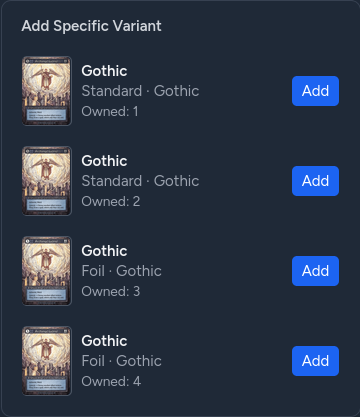
1783828420_DRMsovbCho.png

"card name",set,finish,product,"variant slug",quantity,notes
"Archangel Gabriel",Gothic,Standard,Booster,006-archangel_gabriel-b-s,1, 
"Archangel Gabriel",Gothic,Standard,Booster,got-archangel_gabriel-b-s,2,
"Archangel Gabriel",Gothic,Foil,Booster,006-archangel_gabriel-b-f,3,
"Archangel Gabriel",Gothic,Foil,Booster,got-archangel_gabriel-b-f,4,

steelslime37

steelslime37

OP

With furhter testing, the behavior seems inconsistent. Sometimes the cards using the name slug are correcly reflected in the deck builder overlay, sometimes they're not. I have not been able to isolate the specific reason for which are correct and which are incorrect.

steelslime37

steelslime37

OP

Another clue: when trying to add Craterize to my deck, even though I've added one under each of the Beta variants, the deck builder didn't recognize I owned one until adding an Alpha version. So internally, I'm guessing the deck builder overlay is only checking the first entry it encounters for a card name, rather than adding/merging all variants.

Genesis

Genesis

Admin Premium

Thanks for the detailed report. I'm going to sit down today and spend some time investigating the issue. 

Genesis

Genesis

Admin Premium

Ok, geez, this ended up being a bigger headache than I expected, and I had to patch a ton of things due to a data drift that occurred.

I've patched everything up and added a more thorough overlay handler. 

Can you try again please and see if it works correctly now for you? 

steelslime37

steelslime37

OP

Genesis said:

Ok, geez, this ended up being a bigger headache than I expected, and I had to patch a ton of things due to a data drift that occurred. I've patched everything up and added a more thorough overlay handler.  Can you try again please and see if it works correctly now for you? 

OK, good news first: it appears that the overlay in the deck builder is working now. I didn't test it super thoroughly, but basic check, looks good.

Bad news: I think whatever you did confused the filters on the "My Collection" page. Now when I try to filter by just Alpha, I also get all my Beta cards. And when I try to filter "Promo" cards, I see everything.

Thanks for being so responsive! Let me know how else I can help!

Genesis

Genesis

Admin Premium

steelslime37 said:

Genesis said: Ok, geez, this ended up being a bigger headache than I expected, and I had to patch a ton of things due to a data drift that occurred. I've patched everything up and added a more thorough overlay handler.  Can you try again please and see if it works correctly now for you?  OK, good news first: it appears that the overlay in the deck builder is working now. I didn't test it super thoroughly, but basic check, looks good.Bad news: I think whatever you did confused the filters on the "My Collection" page. Now when I try to filter by just Alpha, I also get all my Beta cards. And when I try to filter "Promo" cards, I see everything.Thanks for being so responsive! Let me know how else I can help!

 Ah, thanks for spotting that. I rolled out another fix this morning if you want to check that again.

Thanks!

steelslime37

steelslime37

OP

Looks better now! Thanks for being so responsive!

Create an account or sign in to reply

You need to be a member to post in this topic.

Create an account

Join the community. It only takes a minute.

Register

Sign in

Already have an account? Welcome back.

Sign in